Minecraft Mobs Not Spawning? 12 Fixes That Work
Minecraft mobs not spawning? Check difficulty, light level, mob caps, simulation distance and special rules for Happy Ghasts, Creakings and Drowned.

Minecraft Mobs Not Spawning? 12 Fixes That Work
If Minecraft mobs are not spawning, the problem is usually caused by difficulty settings, light, player distance, invalid blocks or the local mob population. Special mobs such as the Happy Ghast and Creaking also have completely different spawning requirements.
The fastest fixes are to confirm that the world is not set to Peaceful, check the doMobSpawning game rule, remove nearby light sources and make sure the spawning platform is built from valid full blocks. If the farm remains empty, unexplored caves may be filling the mob cap.
This guide covers Java and Bedrock Edition, including troubleshooting steps for ordinary hostile mobs, Happy Ghasts, Creakings and Drowned.
Quick Minecraft mob-spawning checklist
Check these conditions before rebuilding your farm:
- The world is set to Easy, Normal or Hard.
- The
doMobSpawninggame rule is enabled. - The spawning area is dark enough for the intended mob.
- The player is neither too close nor too far away.
- The platform uses valid spawning blocks.
- The mob has enough room to appear.
- The farm is in the correct biome and dimension.
- Nearby caves and other farms are not filling the mob cap.
- The chunks containing the farm are being simulated.
- No add-on, mod, data pack or server setting changes spawning.
If all ten conditions are correct, move to the mob-specific sections below.
1. Make sure the difficulty is not Peaceful
Most hostile mobs cannot spawn while the world difficulty is set to Peaceful. Existing hostile mobs may also disappear when the difficulty is changed to Peaceful.
Open the world settings and select Easy, Normal or Hard.
Players with permission to use commands can check or change the difficulty with:
/difficulty normal
On a multiplayer server, check the server configuration as well. A client-side difficulty display does not always tell you whether the server owner has changed the main world setting.
2. Check the doMobSpawning game rule
Minecraft has a game rule that controls natural mob spawning. If doMobSpawning is disabled, ordinary mobs will not appear naturally even when every other condition is correct.
Check the setting with:
/gamerule doMobSpawning
Enable natural spawning with:
/gamerule doMobSpawning true
Commands require cheats or the appropriate server permissions.
The rule only affects natural spawning. It does not prevent every other method of creating an entity. Spawn eggs, commands, spawners and special transformation mechanics can behave differently.
3. Remove light from hostile-mob platforms
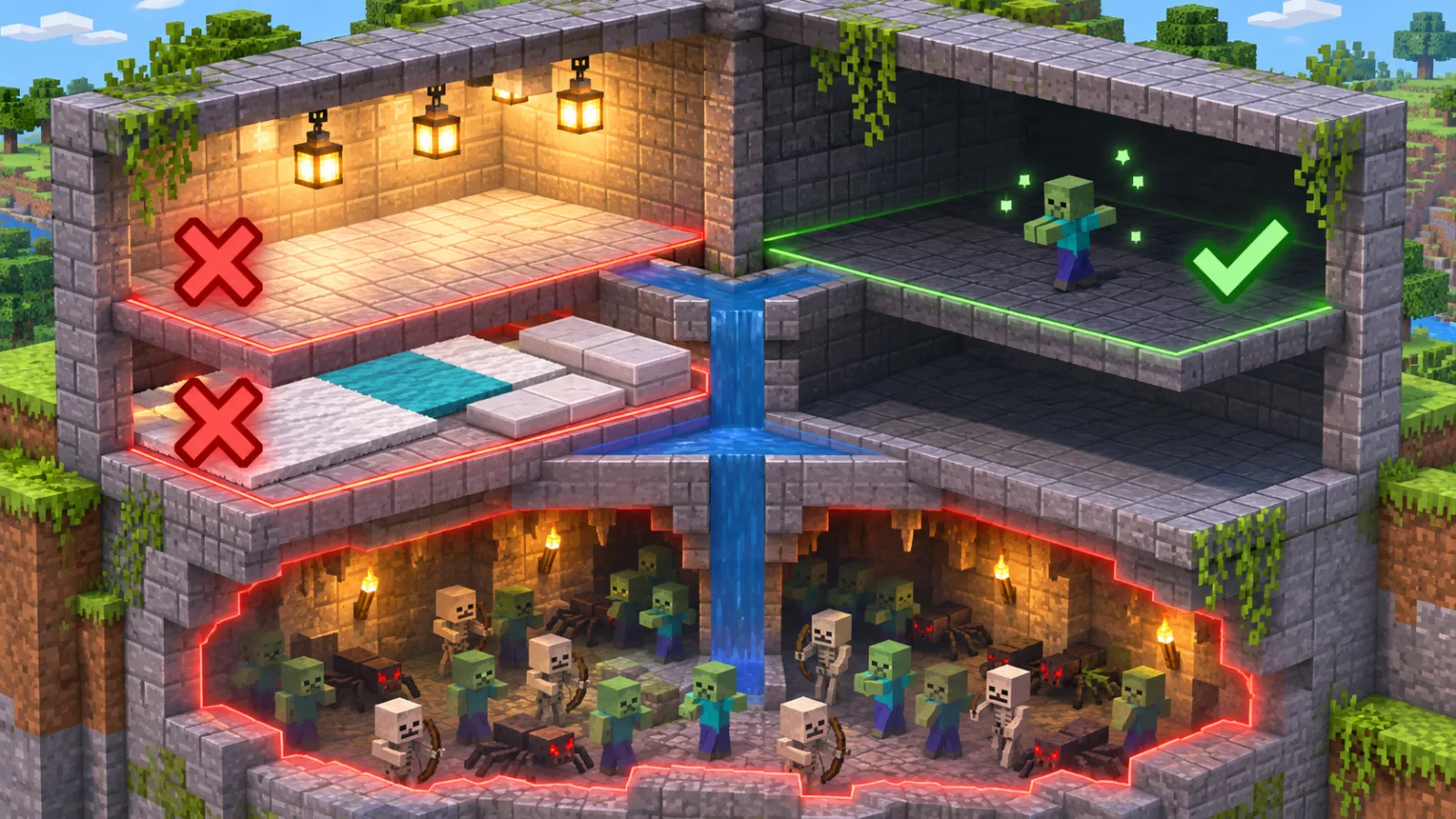
Most common hostile mobs need complete darkness to spawn naturally. Minecraft’s official survival guide states that most hostile mobs in the Overworld require a block light level of zero.
Check for:
- Torches behind walls
- Lanterns above the platform
- Glow lichen
- Lava
- Fire
- Redstone torches
- Light passing through openings
- Naturally luminous blocks
- Light added by a mod or add-on
Temporary lighting used while building a farm is easy to forget. Remove every light source, leave the farm and return after the area has become active again.
Some mobs have different rules. A Creaking, for example, is controlled by the day-and-night cycle rather than the ordinary hostile-mob light requirement.
4. Stand at the correct distance
Mobs do not normally spawn directly beside the player. They also cannot spawn or remain active indefinitely when the player is too far away.
A common farm mistake is building an AFK platform immediately next to the spawning floor. Move the waiting position farther away and test again.
The exact active area depends on:
- Java or Bedrock Edition
- The world’s simulation distance
- Single-player or multiplayer
- Server configuration
- The type of mob
- How the mob was created
Do not rely on a Java farm tutorial when playing Bedrock Edition. The same structure can produce very different results because the editions do not process spawning and simulation identically.
5. Check the mob cap and nearby caves
Minecraft limits how many mobs can exist in an active area. Hostile mobs hidden in caves, abandoned mineshafts or other dark spaces can fill the population limit before your farm receives any spawn attempts.
This is especially common when a farm:
- Is built above a large cave system
- Is close to the ground
- Has dark terrain around it
- Is near another active mob farm
- Runs on a server with several players online
Enter Spectator mode in a test copy of the world or inspect the surrounding caves manually. Light or otherwise spawn-proof nearby areas so more spawn attempts are directed towards the farm.
Building high above an ocean can also reduce the number of valid spawning locations, although the correct design still depends on the edition and mob.
6. Replace invalid spawning blocks
Many mobs require a valid solid floor and enough empty space for their body. A platform that looks solid may contain blocks that prevent spawning.
Common problem blocks include:
- Bottom slabs
- Carpets
- Glass
- Leaves
- Buttons
- Rails
- Pressure plates
- Some transparent or partial blocks
These blocks are frequently used to spawn-proof an area. Accidentally placing them inside the farm can stop it from working.
For testing, replace the platform with ordinary full blocks and remove decorations. Once mobs begin appearing, restore the design one section at a time to identify the problematic block.
Also check the available headroom. Spiders, Endermen and other unusually shaped mobs need different amounts of space.
7. Verify the biome, dimension and height
Not every mob can spawn everywhere. Spawn rules can check the biome, dimension, brightness, surface type, difficulty, height and distance from the player.
Before troubleshooting a rare mob, confirm that the farm is in the correct location.
Examples include:
- Drowned naturally appearing in oceans and rivers
- Creakings being associated with Pale Gardens and Creaking Hearts
- Nether mobs requiring their appropriate Nether conditions
- Structure-related mobs requiring a specific structure or bounding area
- Aquatic mobs requiring valid water blocks
Use the F3 debug screen in Java Edition or enable coordinates in Bedrock Edition to verify the farm’s location. If necessary, test the same design in a fresh Creative world.
8. Increase or verify simulation distance
Bedrock Edition uses simulation distance to determine which chunks actively process entities, redstone and natural spawning. Mojang has also confirmed that Bedrock’s mob spawn range scales with simulation distance.
A farm can therefore be visible without being fully active.
Open the world settings and check the simulation distance. On a Realm or dedicated server, the owner may need to adjust the server setting.
Increasing it may activate more of the farm, but it can also activate additional caves and spawning spaces. That can make a mob-cap problem worse. Test one change at a time.
Render distance is not the same as simulation distance. Render distance controls what you can see; simulation distance controls where many game processes actually run.
9. Account for other players
Multiplayer changes which chunks are loaded and where mobs can spawn. Another player exploring caves or standing near a different farm may affect the active mob population.
To test the farm:
- Ask other players to leave the dimension.
- Stop other nearby farms.
- Remove loose hostile mobs from loaded areas.
- Return to the intended AFK position.
- Wait through several spawn cycles.
If the farm suddenly works, its design may be correct but unsuitable for the server’s normal player activity.
10. Check mods, add-ons and server configuration
Mods, data packs, behavior packs and server plugins can change spawn rates, mob caps, difficulty rules or the mobs allowed in a world.
Temporarily test without third-party content if possible. Do this in a backup or separate copy of the world.
Server owners should inspect:
- Difficulty
- View and simulation distance
- Mob-spawning settings
- Per-world configuration
- Entity activation ranges
- Plugin-specific mob limits
- Protected regions
- Disabled dimensions
- Performance optimizations
A plugin designed to reduce lag may silently remove mobs or limit how many can spawn near a farm.
11. Update Minecraft and reload the world
Spawning bugs occasionally appear after an update, particularly in previews, snapshots or worlds using experimental features.
Try the following:
- Save and exit the world.
- Restart Minecraft.
- Confirm that every player uses a compatible version.
- Update the game to the latest stable release.
- Remove outdated resource or behavior packs.
- Test the farm in a copy of the world.
Avoid assuming that a farm is permanently broken immediately after an update. Check the official changelog for changes to entities, blocks, simulation or spawn rules.
12. Test with commands or a spawn egg
A controlled test helps determine whether the problem is natural spawning or the mob itself.
In a Creative copy of the world:
- Use a spawn egg on the intended platform.
- Use
/summonif commands are available. - Move the mob through the farm.
- Check whether water streams, fall chambers and collection systems work.
If the mob appears with a spawn egg but never naturally, the problem is probably a spawn condition, population limit or game rule.
If the mob appears but immediately suffocates or escapes, the farm’s physical design is the problem.
Why is my Happy Ghast not spawning?

A Happy Ghast does not spawn naturally like an ordinary animal. It must be raised from a Dried Ghast.
The correct process is:
- Find a Dried Ghast in a Nether Fossil structure or craft one using one Soul Sand block and eight Ghast Tears.
- Bring the Dried Ghast to the Overworld.
- Keep it continuously waterlogged.
- Wait approximately 20 minutes for it to produce a Ghastling.
- Wait for the Ghastling to mature or feed it Snowballs to accelerate its growth.
If the Dried Ghast is no longer waterlogged, its hydration progress reverses. Mining the block also removes its saved hydration progress.
Check that the block is actually waterlogged rather than merely placed beside water. Breaking it repeatedly or allowing the water to drain will prevent the Ghastling from appearing.
Why is my Creaking not spawning?
A naturally connected Creaking needs an active Creaking Heart.
For a Creaking Heart to work:
- It must be night.
- The heart must be placed between two Pale Oak Logs.
- The heart and logs must be correctly aligned along the same axis.
- The heart must be active rather than dormant.
- There must be room for the Creaking to appear.
Creaking spawning is based on the day-and-night cycle and is not controlled by ordinary light levels. Making the room darker during the day will not activate the heart.
Naturally generated Pale Oak trees can contain Creaking Hearts. Player-grown Pale Oak trees grow without these natural decorations, so planting Pale Oak Saplings alone is not a reliable way to obtain a heart.
If a Creaking disappears, inspect the heart. A heart-connected Creaking can be removed when daytime begins, when it moves too far from its heart or when the heart is destroyed.
Why are Drowned not spawning?

Drowned can appear naturally in oceans and rivers. Zombies can also transform into Drowned after remaining underwater long enough.
If a Drowned farm is empty:
- Confirm that the farm is in a valid ocean or river biome.
- Check the natural hostile-mob light conditions.
- Make sure the water volume is large and deep enough for the design.
- Check whether other hostile mobs have filled the mob cap.
- Verify that you are waiting at the intended distance.
- Confirm that the tutorial matches Java or Bedrock Edition.
A conversion farm follows different rules from a natural-spawn farm. If you are converting zombies, first verify that zombies are entering the water and remaining submerged instead of escaping or dying.
Why are Minecraft items or experience not appearing?
Items, item frames and experience orbs are entities, but they do not all follow the same rules as naturally spawning mobs.
Check the relevant game rules:
doEntityDropscontrols drops from non-mob entities, including item frames.doTileDropscontrols whether blocks drop items when broken.doMobLootcontrols mob loot and affects rewards from killed mobs.keepInventorychanges what happens to a player’s inventory after death.
Dropped items and experience orbs can normally disappear after roughly five minutes of active loaded time. If you died far away, the timer generally does not continue until the area is loaded again, but multiplayer activity can keep those chunks active.
Items can also be destroyed by lava, fire, explosions or cactus blocks. Check below the death location and around water streams, hoppers and ledges before assuming the items failed to spawn.
Java versus Bedrock mob-spawning differences
| Check | Java Edition | Bedrock Edition |
|---|---|---|
| Simulation | Controlled by loaded and ticking chunks | Strongly affected by simulation distance |
| Farm tutorials | Use Java-specific designs | Use designs tested specifically on Bedrock |
| Multiplayer | Multiple players influence loaded areas and spawning | Player locations and simulation areas can strongly affect results |
| Commands | Java command syntax and server properties | Bedrock commands, world settings and behavior packs |
| Add-ons | Mods and data packs can change spawning | Behavior packs can define or replace spawn rules |
| Testing | F3 and Spectator mode are useful | Coordinates and a copied Creative world are usually easier |
Never assume a farm is cross-edition unless its creator explicitly tested both versions.
Fast diagnostic order
Use this order to find the problem without rebuilding everything:
- Change the difficulty from Peaceful.
- Enable
doMobSpawning. - Remove all light from the spawn platform.
- Replace the floor with full solid blocks.
- Move the AFK position.
- Check for mobs in nearby caves.
- Verify the biome and dimension.
- Check simulation distance.
- Test without other players.
- Disable add-ons or plugins in a copied world.
- Try a spawn egg.
- Rebuild only after the failed condition has been identified.
Frequently asked questions
Why are no hostile mobs spawning at night?
Check that the world is not on Peaceful and that doMobSpawning is enabled. Nearby caves may also be using the available hostile-mob population.
Why does my mob farm work slowly?
The farm may be competing with caves and surface areas. Player distance, simulation distance, multiplayer activity and invalid platform blocks can also reduce output.
Can mobs spawn on slabs?
Many mobs cannot spawn on bottom slabs. For troubleshooting, use ordinary full blocks before adding slabs or other spawn-proofing materials.
Do torches stop all mobs from spawning?
Torches stop many common hostile mobs by raising the light level, but not every mob uses the same rules. Creakings, for example, depend on an active Creaking Heart and the day-and-night cycle.
Why does my farm work in Java but not in Bedrock?
The editions use different spawning, despawning and simulation systems. Build locations, AFK platforms and collection mechanisms often need to be redesigned for Bedrock.
Does increasing simulation distance fix mob farms?
Sometimes, but not always. A higher simulation distance can activate the farm while simultaneously activating more caves. Test the setting together with cave spawn-proofing.
Tim Buysse
Author & FounderEsports strategist, entrepreneur, and author. Founder of No Noob Agency (nonoob.gg) and Runningvibes (runningvibes.be), covering competitive gaming, digital strategy, and performance.